
Frequently Asked Questions
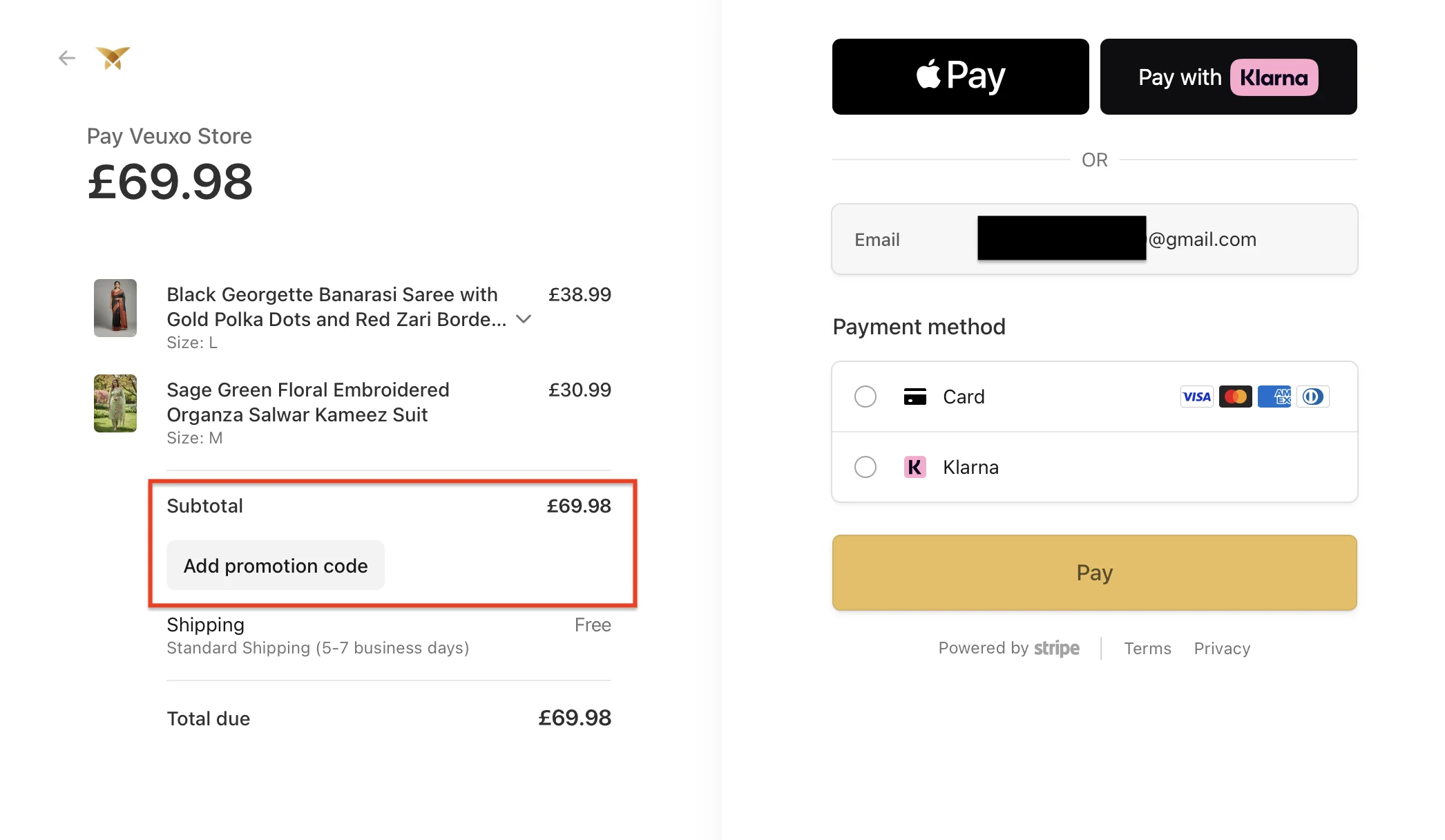
To apply a promo code to your order, follow these simple steps:
- Add items to your shopping cart
- Proceed to checkout
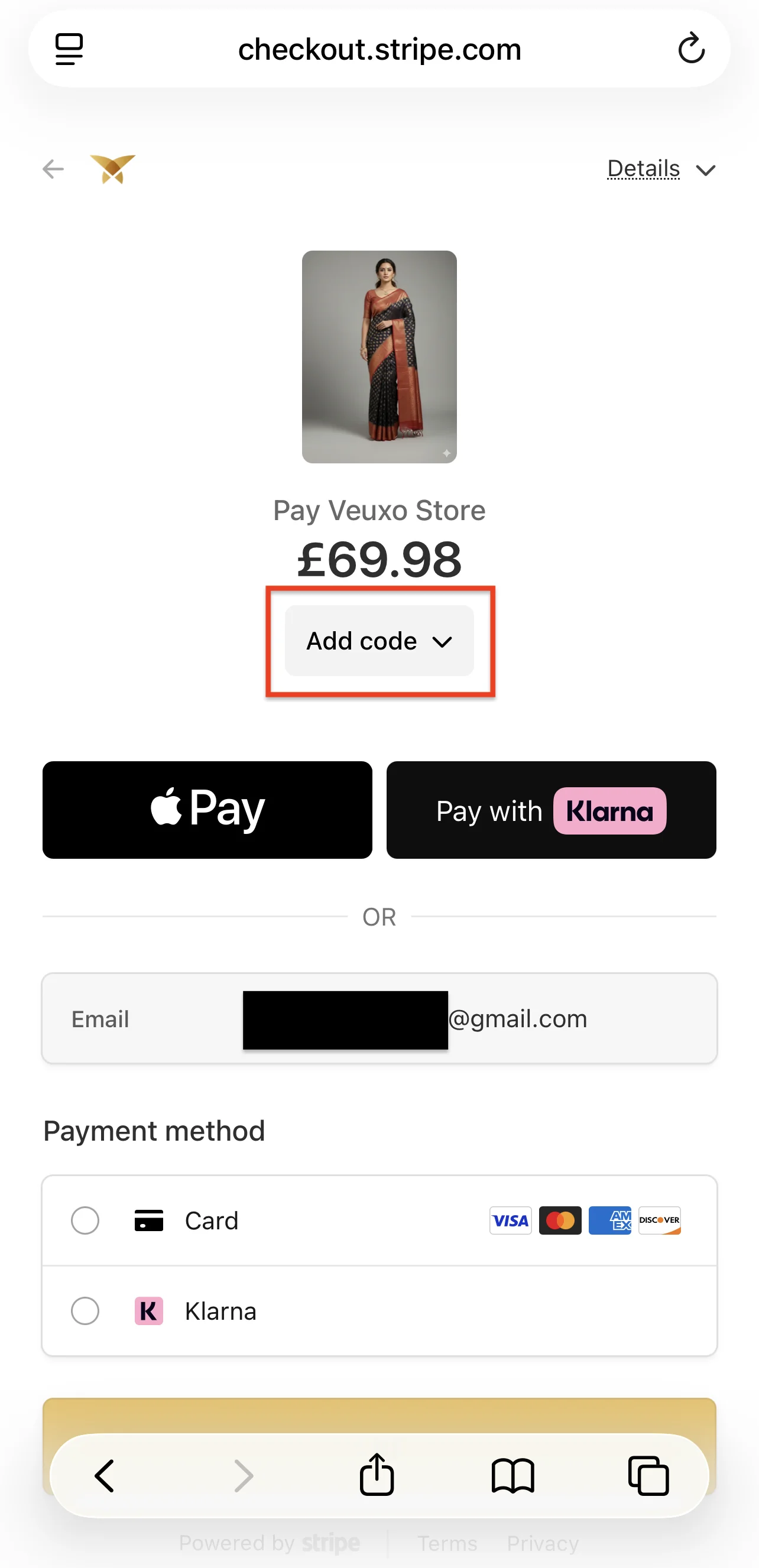
- On the checkout page, look for the "Add promotion code" or "Add code"
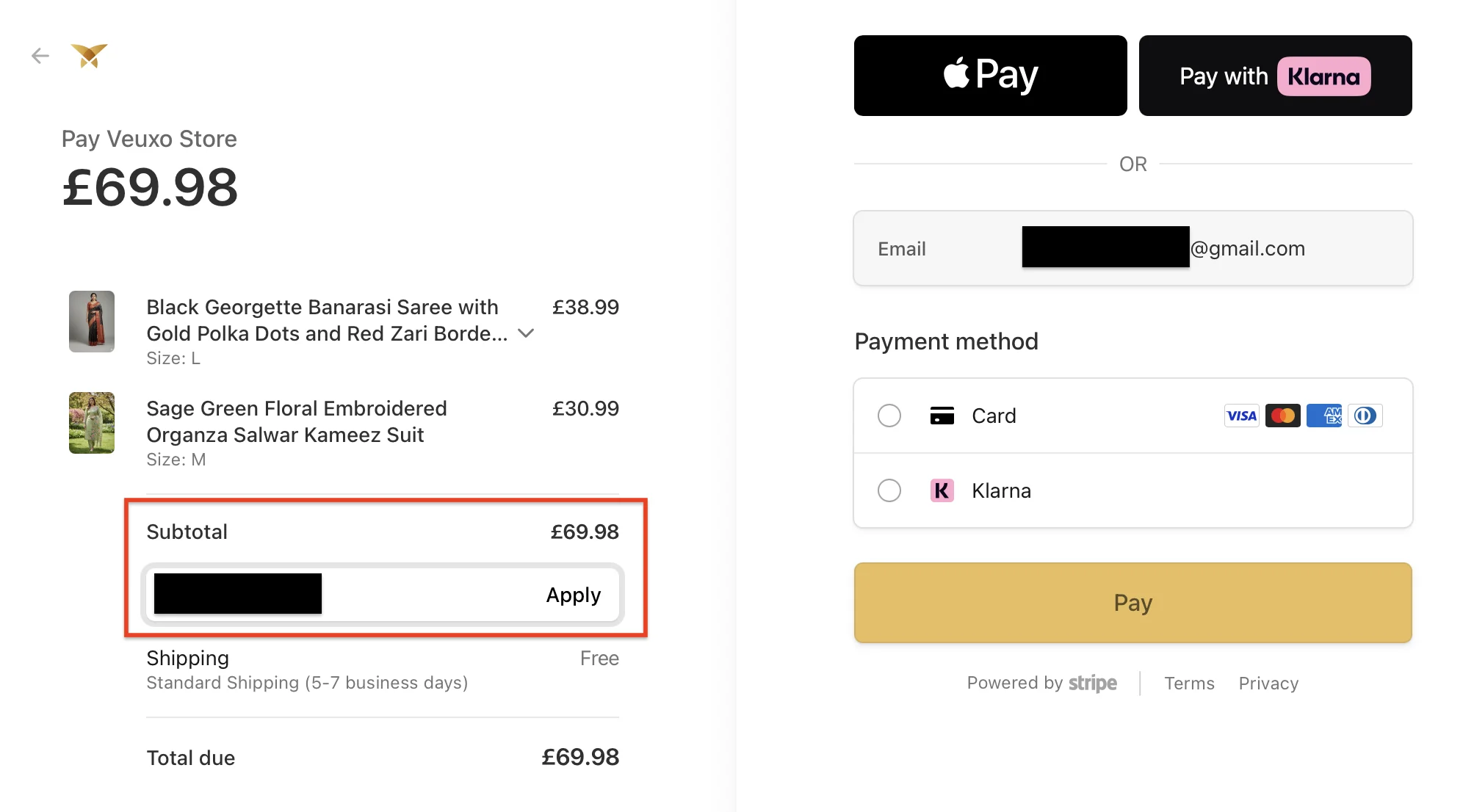
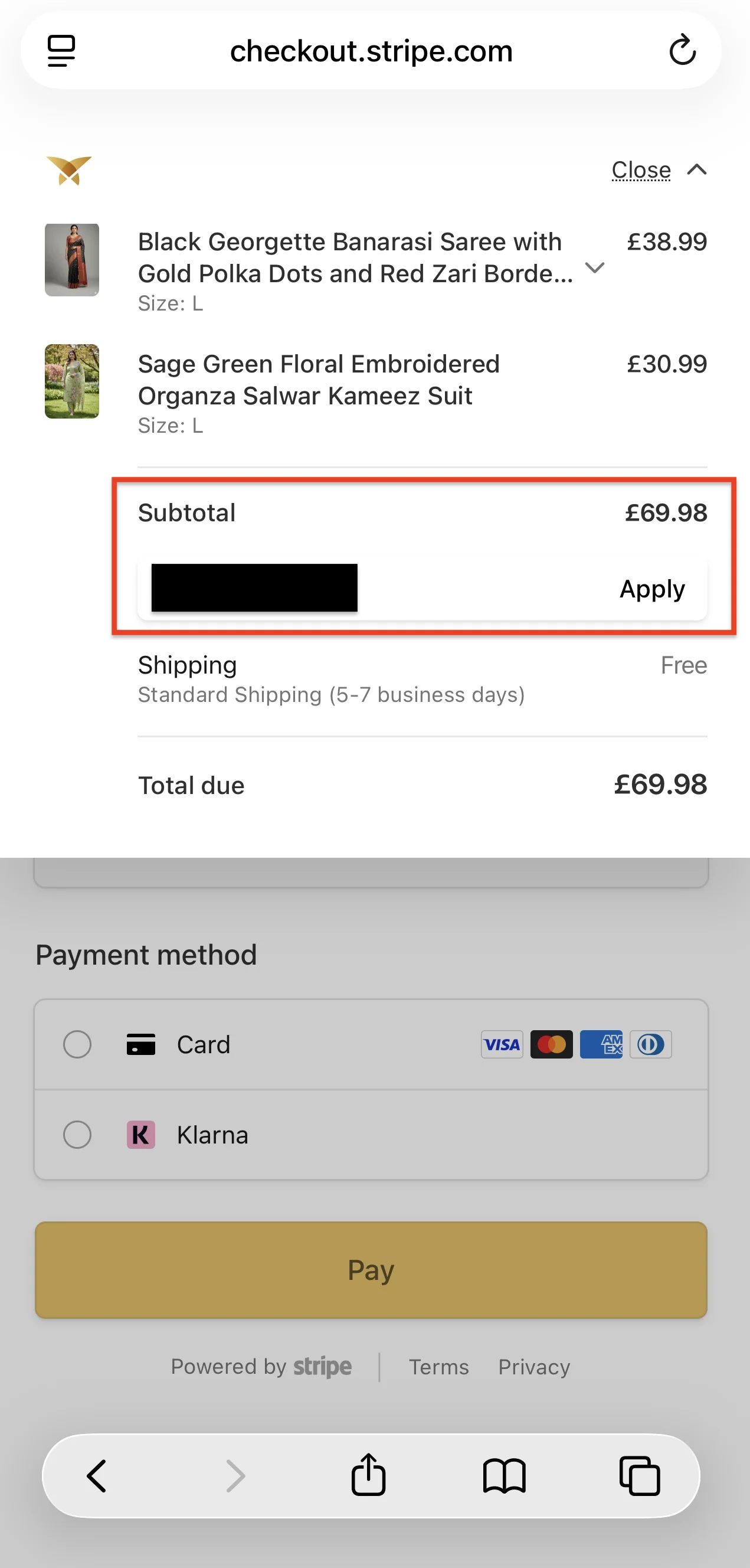
- Enter your promo code in the designated field
- Click "Apply" button
- The discount will be applied to your order and the reduced price will be shown
Step 1: Find the location to enter the promo code
Step 2: Enter the promo code and apply
Step 3: Successfully applied promo code
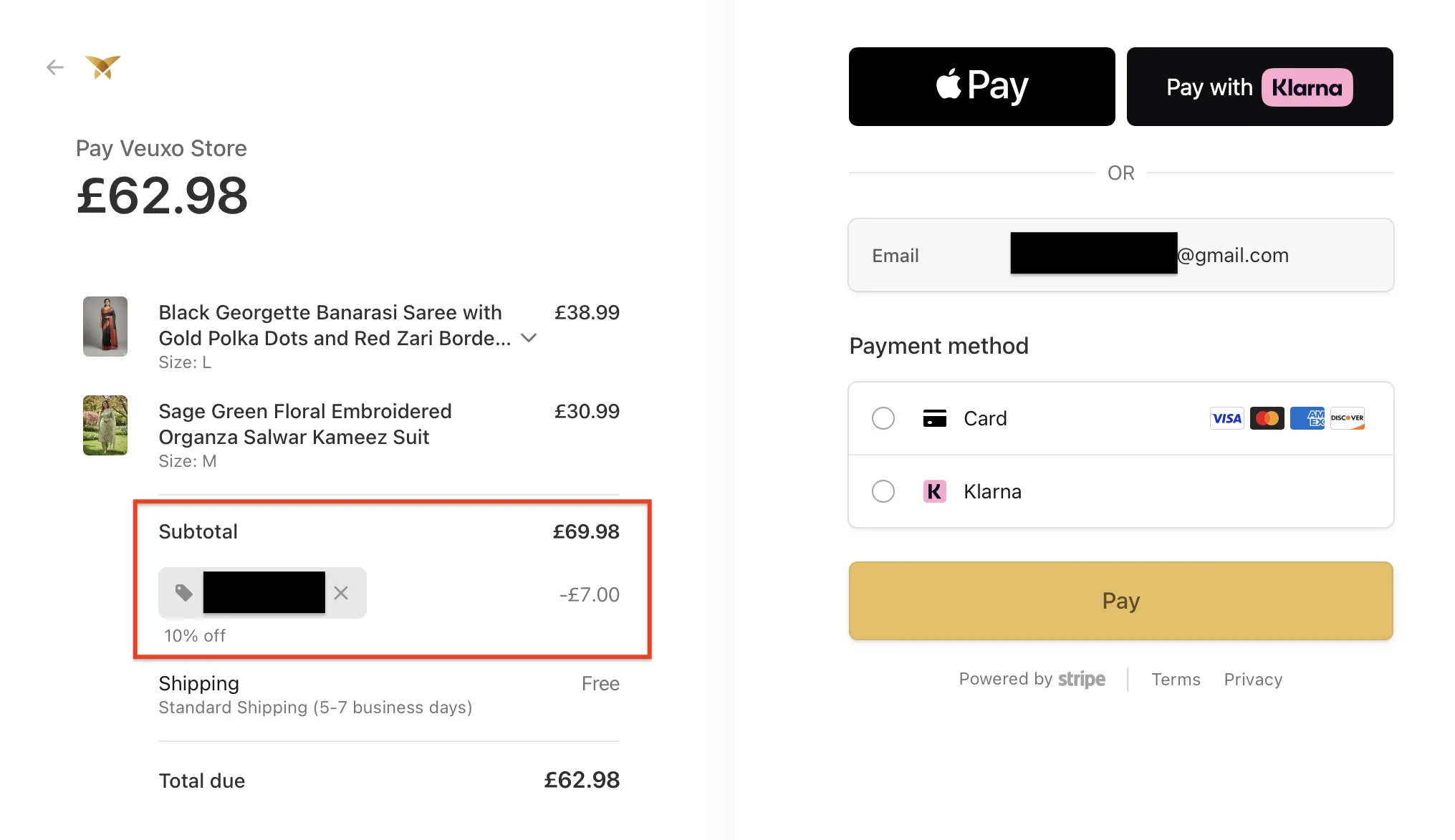
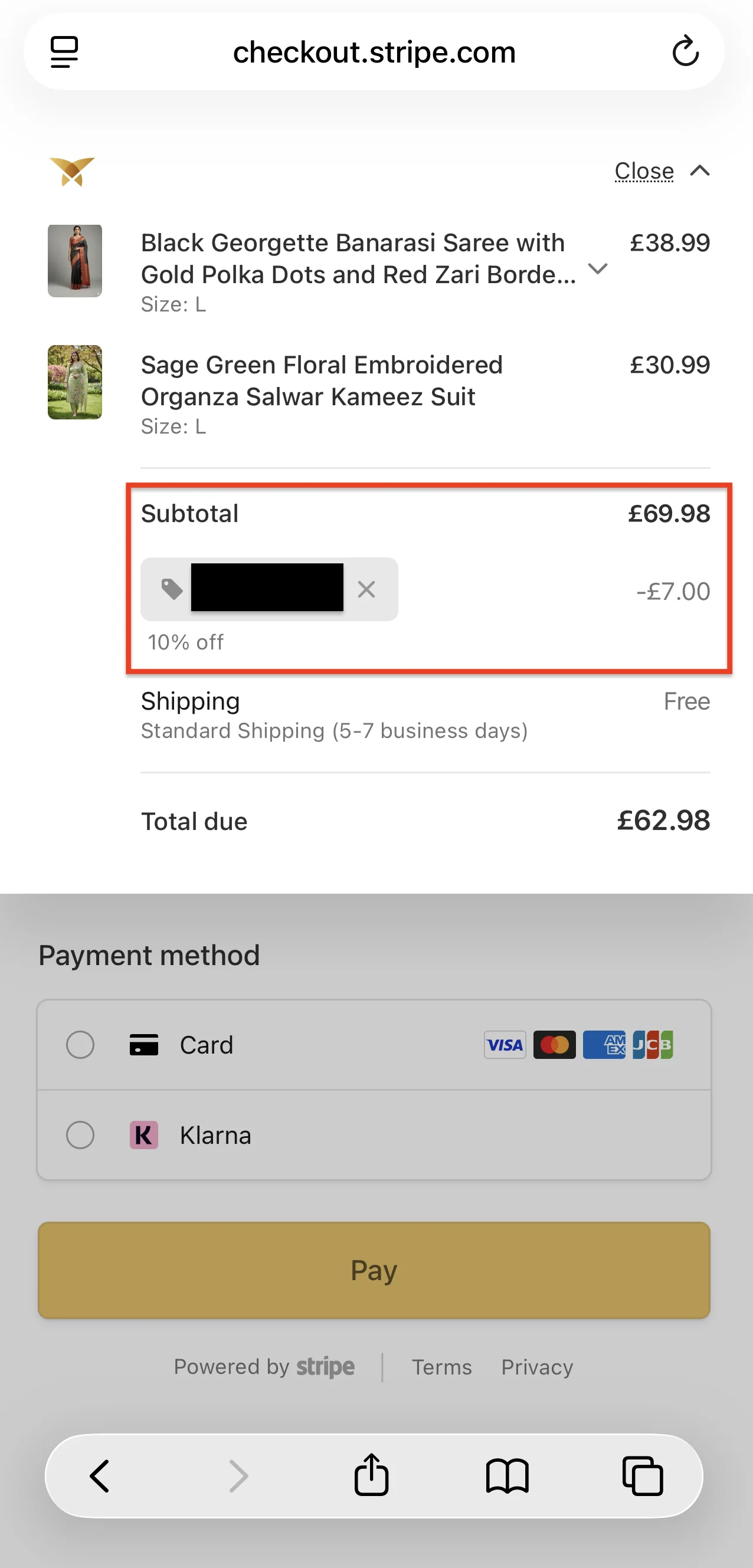
Note: Make sure to enter the promo code exactly as provided (case-sensitive). If you encounter any issues, please contact our customer service team for assistance.
If you have a recent order with us that hasn't shipped yet, you can join a new order to it and ship both together in a single parcel — no second shipping charge.
At checkout, the option appears in the shipping-method list and is tailored to what's in your cart:
- In-stock cart: "Combine with your previous in-stock order" — join your new in-stock items to a previous unshipped in-stock order so they ship together.
- Preorder cart: "Combine with your previous preorder" — join your new preorder items to a previous unshipped preorder so they all ship in one parcel when stock arrives.
How to use it
- Add items to your cart and go to checkout.
- In the Shipping Method section, choose the "Combine with your previous…" option.
- Enter the email and order ID from your previous order's confirmation email.
- Click Find my order. We'll show the shipping address from that order so you can confirm.
- Click Proceed to Secure Payment and complete checkout. Shipping on the new order is free — you're not charged for it, since it ships with your previous order.
Good to know
- Both orders must be the same type — you can't combine an in-stock order with a preorder, or vice versa.
- The previous order must still be unshipped in our warehouse.
- If your new cart contains both in-stock and preorder items, this option isn't available. Those carts have their own ship-together choice instead (see below).
- The new parcel inherits the previous order's shipping address — you don't re-enter it.
- Preorder combines ship together once all preordered stock arrives — the same wait that applies to any preorder.
If your previous order ships before we can combine: very occasionally, the previous order leaves the warehouse before the system can link the two (for example, if you spend a long time at the payment page). In that case, your new order ships separately at the standard shipping rate and we'll email you to let you know.
When your cart has both in-stock and preorder items, you decide how they ship. Normally they ship separately: your in-stock items are shipped immediately, and your preorder ships as soon as it's in stock — and because they go as two shipments, you pay shipping for each. Or you can choose to send everything as a single shipment and pay shipping only once.
How to choose it
- At checkout, find the "How should we ship your in-stock and preorder items?" choice at the top of the Shipping Method section.
- Pick Ship together. The card shows how much you save by paying shipping once.
- Choose Standard shipping or Collect from Store for the combined shipment, then complete checkout as normal.
How it works
- Everything ships as one shipment once your preorder is in stock, under a single tracking number.
- Your in-stock items wait and travel with your preorder, so they will not arrive before it. If you want your in-stock items sooner, choose Ship separately instead (the default).
- You pay one shipping charge for the whole shipment instead of one per order.
- Only Standard shipping or Collect from Store apply, because the shipment leaves once your preorder is in stock. Faster methods are not offered.
- Free shipping is evaluated on the combined subtotal of your in-stock and preorder items.
Your in-stock and preorder items still appear as two orders in your account and confirmation email, but they ship together in the same parcel.
Veuxo offers a wide range of Indian clothing in Dublin, including sarees, salwar suits, lehengas, kurtis, sherwanis, and Indo-Western outfits for women, men, and kids. Shop online with Ireland-wide delivery.
Yes. Veuxo is a trusted Indian boutique in Dublin, offering traditional and modern Indian fashion, bridal wear, festive collections, and matching accessories.
Yes. Veuxo offers a wide range of Indian dresses online in Ireland, including sarees, lehengas, salwar suits, kurtis, and Indo-Western wear. Shop securely online and enjoy fast Ireland-wide delivery.
Yes. Our Dublin saree collection includes silk sarees, designer sarees, party wear sarees, bridal sarees, and festive styles for every special occasion.
Yes. Customers from Cork and nearby areas shop with Veuxo for Indian clothing, ethnic wear, jewellery, and festive collections.
We stock sarees, lehengas, salwar kameez, kurtis, sherwanis, kurta sets, Indo-Western outfits, and ethnic wear for all ages.
Yes. Our women's collection includes elegant sarees, lehengas, Anarkali suits, kurtis, gowns, and festive outfits for weddings and celebrations.
Yes. Veuxo offers sherwanis, kurta pajama sets, Nehru jackets, and Indo-Western men's wear suitable for weddings, festivals, and formal events.
Yes. Our Indo-Western men's collection combines traditional Indian style with contemporary fashion for modern celebrations.
Yes. We offer Indian kids' clothing for boys and girls, including festive outfits, traditional wear, and wedding collections in various sizes.
Absolutely. Our Dublin fashion jewellery collection includes necklaces, earrings, bangles, maang tikkas, and accessories to complete your ethnic look.
Yes. Our collection includes outfits for weddings, engagements, festivals, religious ceremonies, parties, and family celebrations.
Yes. We regularly update our collections with the latest Indian fashion, designer styles, and seasonal ethnic wear available in Ireland.
Veuxo offers premium quality fabrics, modern and traditional designs, affordable pricing, personalised service, and Ireland-wide shipping.
Yes. We have Indian clothing for women, men, and children, along with matching jewellery and accessories, making Veuxo your one-stop ethnic fashion destination.